

CRM & lead management
Every Enquiry. Every Customer.
One Clear View.
Filari CRM brings your enquiries, customer conversations, sales activity and follow-ups into one organised business view.
Capture leads from your website, WhatsApp, campaigns, calls and team — then know who owns the opportunity, what happened last and what should happen next.
Enquiries can come from anywhere.
They shouldn't stay everywhere.
[01 HERO MULTI-SOURCE CRM] · illustrative record, sample data
The connected lead journey
From enquiry to customer — without losing the context.
Wherever the enquiry starts, it enters one structured journey — and the next action stays visible the whole way through.
Lead journey — live
Six sources · one record · eight stagesSales team sells
AI assists
Automation executes
[02 FLAGSHIP DARK LEAD FLOW] · illustrative journey, sample data
Enquiries can come from anywhere.
Customer history shouldn't stay everywhere.
Capture01
Understand02
Act03
Convert04
[03 LIVE CRM PIPELINE] · sample pipeline state
When customer information is everywhere
The lead exists. But does your team know what happened?
Phone
WhatsApp chats, on a personal number
Excel
A lead list somebody updates on Fridays
The website enquiry, unread
Notebook
"Call tomorrow" — written yesterday
Team chat
"Who is handling this?"
Manager
"What happened to yesterday’s enquiry?"
What actually goes wrong
Leads usually don't disappear.
Visibility does.
[03 BEFORE — SCATTERED WORKSPACE]
Before / after
Same enquiries. A much more organised sales process.
Website enquiry
→ email inbox
→ personal phone
Phone call
→ notebook
Campaign lead
→ Excel
Follow-up
→ memory
Reporting
→ built by hand
All sources
captured automatically
Filari CRM
one record each
Customer profile
full history
Owner
named, not assumed
Next action
dated
Pipeline
visible by stage
Follow-up
reminded
Management visibility
without asking anyone
The customer story in one place
Know the conversation before you continue it.
Rahul Mehta
ABC Healthcare · Gurugram
[05 CUSTOMER 360° PROFILE] · sample record, demo data
Activity timeline
One day, automatically recordedDon't ask the customer to repeat their story.
[06 CUSTOMER TIMELINE]
Capture
One CRM doesn't mean one lead source.
Every channel your customers actually use, feeding one customer history — where the platform or API supports it.
Website forms
structured fields, not just a message
conversation linked to the record
Google Ads
campaign and keyword captured
Meta campaigns
source and creative recorded
Call / telephony
logged with duration and outcome
thread attached to the customer
Referral
who referred, recorded
Walk-in / staff entry
added in seconds
QR campaign
offline traced to online
A better form creates a better first conversation
Not name, email, message. Ask the five things that decide who calls, and what they say.
Also captured silently: page, CTA, UTM source and medium, campaign, referrer and device. [07 WEB FORM]
Get the right lead to the right person
Rules are yours to define — by service, geography, source, value, team or any field you capture. [08 LEAD ROUTING]
Qualification & priority
Not every enquiry needs the same attention.
What qualifies a lead
[09 QUALIFICATION]
Priority, with the reason shown
Lead A · high
Lead B · medium
[10 LEAD SCORE]
Scoring you can explain
Priority comes from profile, actions, engagement and criteria your business defines — and the card always shows why it scored that way.
AI can assist with prioritisation. It does not present a probability as a certainty, and a salesperson can always disagree with it.
One customer shouldn't become five records
Manual merge stays available for the cases rules cannot judge. [21 DUPLICATE MATCH]
Sales pipeline
See where every opportunity stands.
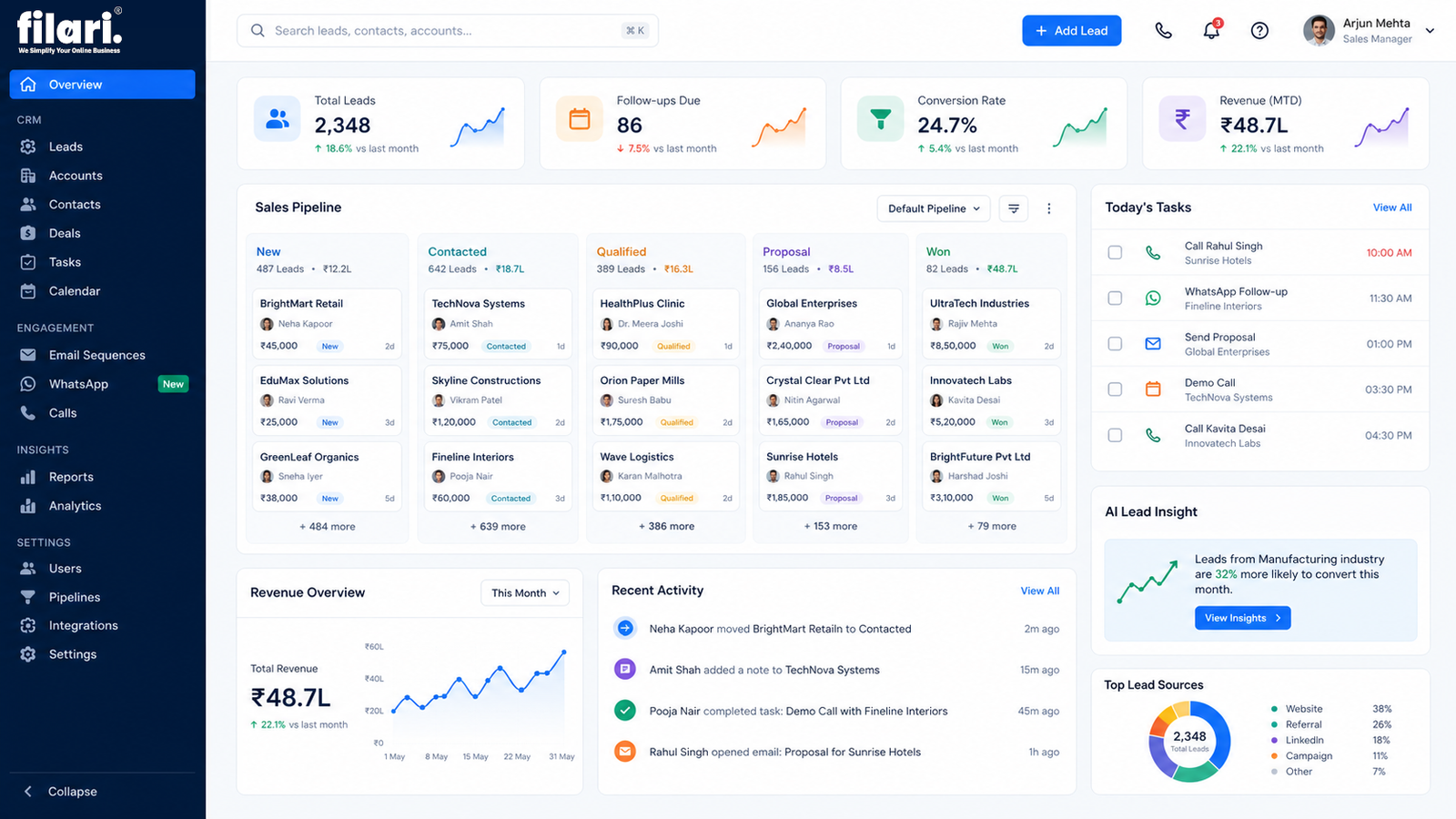
[11 PIPELINE] · sample opportunities, demo data
Your CRM should match how you sell — not force you into someone else's pipeline
Real estate
New → Qualified → Site visit → Negotiation → Booking
Education
Enquiry → Counselling → Demo → Admission
Travel
Enquiry → Requirement → Itinerary → Booking
Healthcare
Enquiry → Appointment → Visit → Follow-up
Professional services
Enquiry → Consultation → Proposal → Client
Manufacturing
RFQ → Technical review → Quote → Order
E-commerce / wholesale
Enquiry → Product → Quote → Order
Website projects
Enquiry → Discovery → Proposal → Won
One company selling websites, apps, LMS and automation may need four separate pipelines — kept apart rather than mixed into one funnel. [35 INDUSTRY PIPELINE]
The most important CRM question
What should happen next?
Every lead should carry three things: an owner, a stage, and a next action with a date on it.
How the next action gets set
A lead without a next action is a lead waiting to be forgotten.
Today
3 overdue[13 CRM FOLLOW-UP CALENDAR]
Conversation history, in one record
Staff see the context before they contact the customer. [16 CONVERSATION HISTORY]
Calls & telephony — optional integration
Call recording only where lawful and configured. [17 CALL ACTIVITY]
Email & meetings
[18 MEETING]
Conversations that don't disappear
WhatsApp starts the conversation. CRM keeps the context.
Watch the chat on the left and the record on the right. Every answer the customer gives becomes a field — with nobody copying anything into a spreadsheet.
The record fills itself as the conversation happens.
[15 WHATSAPP CRM SYNC] · relevant business conversation and activity, per the configured integration
What WhatsApp integration actually requiresAn appropriate WhatsApp Business Platform setup. Business-initiated messages may need approved templates and must follow current Meta and WhatsApp rules. There is no such thing as unlimited messaging — platform, BSP and per-message charges may apply separately.
Illustrative simulation · fictional contact and demo data
AI inside the customer context
Understand a lead
without reading every message.
What goes in
[19 AI LEAD SUMMARY]
Rahul Mehta · ABC Healthcare
AI summaryRequirement
Healthcare website + booking automation
Budget
₹75,000 – ₹1,00,000
Timeline
Within 6 weeks
Primary concern
Current website does not generate organised appointments
Last interaction
Proposal shared yesterday
Next action
Follow up Friday
Recommended next action
·Follow up today — proposal is 24 hours old
·Proposal awaiting response for 3 days
·Payment pending on a won deal
·No next activity scheduled on 6 leads
·High-value enquiry needs attention
·Customer asked for a revised quotation
[20 AI NEXT ACTION]
Where AI stops
AI recommendations are assistance. The sales team retains control of the decision, the pricing and the relationship.
It does not decide which leads are guaranteed to convert. Prediction is not certainty, and a summary is never a substitute for reading the thread when the deal matters.
Lead, deal, customer
The relationship doesn't stop when the deal is won.
Lead
A potential customer who has shown interest.
Deal / opportunity
A qualified commercial opportunity with a value and a stage.
Customer
Someone who has purchased or engaged — and may buy again.
The same person, two opportunities
The customer relationship history stays continuous. A new opportunity opens against the same record rather than starting a stranger from scratch.
[22 CUSTOMER HISTORY]
Won triggers the next thing
A won deal should open the next workflow, not close the record.
Segments, sources & the manager view
Know where your enquiries actually come from.
Segmentation
Segments are for relevance — used within consent, not as a licence to bulk-message. [23 SEGMENTS]
Source attribution
Illustrative figures. Real production numbers are never published in a public demo. [24 ATTRIBUTION]
Today · manager view
Sample dashboard · demo data
Also: pipeline value, source performance, team activity and stage conversion. [25 SALES MANAGER DASHBOARD]
Mobile CRM
Your CRM shouldn't stay on the office desktop.
Sales work does not happen at a desk. The phone is where the lead is answered, the call is made and the stage is updated.
Today
Leads
Lead profile
Pipeline
Follow-ups
Timeline
One real scenario
See it. Act on it. Update it — from anywhere.
Field sales
For real estate, education counsellors, B2B sales, manufacturing reps and anyone who sells on the move.
Mobile CRM is operational, not a read-only dashboard — which is why the update happens in the field instead of that evening.
CRM automation
Stop doing CRM work just to keep the CRM updated.
Rules that maintain the record
[31 WORKFLOW AUTOMATION]
Sales cadence — advanced
Cadences support the seller. They do not replace a personal sales relationship — so we do not over-automate them. [32 SALES CADENCE]
Team collaboration
Customer relationships should belong to the business — not to one employee's phone.
If a salesperson leaves, the history stays. [33 TEAM COLLABORATION]
Roles & permissions
[34 PERMISSIONS]
Bringing your existing data in
From Excel, CSV, an old CRM, Google Sheets or another system. Dirty data is never imported blindly — it just moves the problem.
CRM should connect with the business around it
Connect what works. Don't create another data island.
Analytics, lost reasons & data control
The useful dashboard question is "what needs attention?"
Not "how many charts can we show?"
What the reports answer
[36 CRM ANALYTICS]
Why deals were lost
Recorded once per lost deal, so the pattern becomes visible — useful for pricing, sales training, positioning and marketing.
Customer data needs clear control
We do not claim "100% secure"Security is designed, tested and monitored — an ongoing engineering discipline, not a badge. [37 SECURITY]
The whole thing, working together
The conversation happens everywhere.
The customer story stays together.
"I need your LMS pricing."
"Need 3,000 student capacity."
"Let's talk Monday."
[14 WHATSAPP CHAT]
CRM timeline
[06 CUSTOMER TIMELINE]
Mobile CRM
[38 FINAL CRM ECOSYSTEM]
Filari CRM
Built to support the business around your website.
Filari CRM is a hosted Filari software service. It provides the common relationship layer, and industry-specific modules are added on top according to scope.
The common layer
Don't build a new CRM for every business. Configure the CRM around the business journey.
CRM is not a better Excel sheet
It is a better way to manage the customer journey.
Commercial clarity
What is included, and what is not.
Filari CRM
A hosted Filari SaaS product.
You own
Your business and customer data.
Filari retains
The CRM software, platform, source code and reusable IP.
Eligible website clients
May receive basic Filari CRM access for 12 months under the applicable promotional offer. After that period, the applicable subscription applies.
Advanced CRM configuration
Separately scoped where required.
WhatsApp integration
Separate paid integration and automation service.
WhatsApp Business Platform
Platform, BSP and message charges separate where applicable.
AI features
Optional paid or usage-based.
Telephony
Provider costs separate.
Custom industry modules
Separately scoped.
Pricing model
Priced around your setup, not a headline monthly figure.
We do not publish a cheap fixed monthly price for a system whose cost genuinely depends on users, pipelines and integrations.
CRM setup / implementation
Custom quotation
Filari CRM access
Subscription-based
Advanced automation
Custom add-on
WhatsApp CRM integration
Optional add-on
AI CRM features
Optional usage-based
Custom industry modules
Separately scoped
Start small
Start with visibility. Add automation when you need it.
You don't need enterprise complexity on day one.
Already using something?
Already use HubSpot, Zoho, Salesforce or another CRM?
Filari does not need to replace it. If it works and it integrates, connecting it is usually the better spend.
Replace only when replacement makes sense.
What we can do instead
Why Filari
We don't start with CRM features. We start with how your team sells.
Lead journey first
Understand where enquiries actually come from.
One customer view
Connect the history instead of rebuilding it.
Next action matters
Keep follow-ups visible and dated.
Mobile-first sales
Sales work does not happen only at a desk.
Automate repetition
Don't create CRM admin work.
AI with context
Use AI inside real customer history, not beside it.
Questions
What businesses ask about CRM.
Twenty answers on capture, assignment, follow-ups, WhatsApp, AI limits, integrations, ownership and what is actually included.
01What is CRM lead management?
Capturing prospective customers, organising their information and interactions, assigning responsibility, scheduling follow-ups and tracking progress until they become customers or leave the active sales process.
02Why does a small business need CRM?
Because a small team loses leads the same way a large one does — through invisibility. With five salespeople or one, the questions are identical: who owns this, what happened last, what happens next.
03Can website enquiries automatically enter CRM?
Yes. Website forms and landing pages can create structured CRM records through an appropriate integration, carrying the service, budget, page, campaign and UTM data with them.
04Can WhatsApp leads enter CRM?
Yes. Supported WhatsApp Business integrations can connect relevant conversations and customer activity with CRM records.
05Can all WhatsApp conversations appear inside CRM?
Relevant business conversations can be synchronised according to the selected integration, permissions and platform capabilities — not everything, and not without configuration.
06Can phone enquiries be added to CRM?
Yes, entered manually in seconds or captured and logged through supported telephony integrations.
07Can leads be assigned automatically?
Yes. Assignment rules can route by service, geography, source, value, team or any field you capture, with a fallback when no rule matches.
08Can CRM remind salespeople to follow up?
Yes. Follow-up activities, reminders and escalation are core lead-management use cases — a lead without a next action is the thing CRM exists to prevent.
09Can CRM track where a lead came from?
Yes. Lead source, campaign and UTM data are captured where the website and campaign integration is configured correctly.
10Can different services have different sales pipelines?
Yes, and they usually should. Websites, apps, LMS and automation rarely sell the same way, so they do not belong in one funnel.
11Can CRM track calls and meetings?
Yes — calls, durations, dispositions, meetings, notes and next actions, either manually or through telephony and calendar integrations.
12Can managers monitor sales on mobile?
Yes, according to the selected plan and each user’s permissions — new leads, follow-ups, conversations, tasks and dashboards.
13Can AI summarise a long lead conversation?
Yes, as an optional AI feature using authorised CRM and conversation data.
14Does AI decide which leads are guaranteed to convert?
No. AI may assist with prioritisation and recommendations, but prediction is not certainty and sales judgement remains essential.
15Can a CRM connect with existing software?
Yes — website, WhatsApp, email, calendar, telephony, payments, LMS, e-commerce, booking, ERP, accounting and custom APIs, subject to what each system exposes.
16Can Filari customise CRM for different industries?
Yes. The common relationship layer stays shared; industry pipelines, fields and modules are configured on top of it.
17Can you import our Excel leads?
Yes, after reviewing and mapping the data. We audit, clean and deduplicate before importing rather than moving the mess across.
18Do we need to replace our existing CRM?
Not necessarily. Where the existing system works and integrates, connecting or improving it is often the better decision.
19Is Filari CRM included with website development?
Eligible website clients may receive basic Filari CRM access under the applicable promotional offer. Advanced configuration, automation, WhatsApp, AI and custom modules are separate unless explicitly quoted.
20Who owns our customer data?
You do. Filari retains ownership of the Filari CRM software and platform, not of your business or customer data.
Don't let the next opportunity get lost
Every lead has a story.
Keep the story — and the next action — together.
Start with your current enquiry process. We help organise your leads, customer history and follow-ups, then connect automation where it makes sense.
Capture the enquiry.
Keep the context.
Never lose the next step.
One lead, end to end
Next action
Follow up tomorrow · 11:00 AM
[38 FINAL CONNECTED CRM ECOSYSTEM]